

Navbar
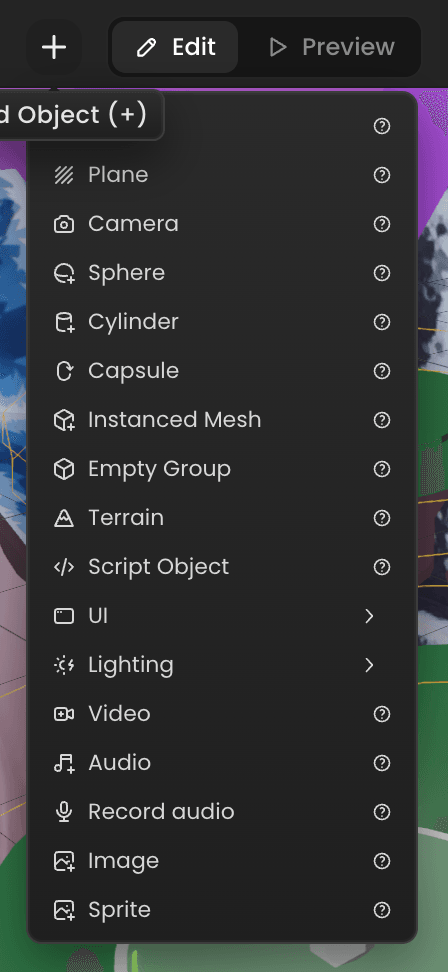
The navbar runs across the top of the editor. The home button is on the left, adding objects and switching between editing and playing are in the middle, and saving, building and publishing are on the right.

Left
| Control | What it does |
|---|---|
| Home button | Goes back to the dashboard. If you have unsaved changes, the editor asks first: Save or Discard. If the agent is still working, it asks whether to Keep working or Stop and leave. |
Middle
| Control | What it does |
|---|---|
| + (Add Object) | Opens the Add Object menu: shapes, lights, media, UI and more. See Creating objects. |
| Edit | The normal editing view of your scene. |
| Preview | Runs your game right here in the viewport, including changes you haven't saved yet. See Preview and test. |
While a preview is running, two more things can show up next to the tabs:
- A QR code button, Open on another device. It opens Test on your device, with a code you can scan to play the game on a phone or headset on the same network.
- An AI is playtesting badge while the agent plays your game to test it. Click Take over to stop the agent and play yourself.
Right
| Control | What it does |
|---|---|
| Undo | Takes back your last change. Cmd/Ctrl + Z. |
| Redo | Puts back what you undid. Cmd + Shift + Z on Mac, Ctrl + Y or Ctrl + Shift + Z on Windows. |
| Save | Writes your scene to disk. Cmd/Ctrl + S. A dot next to it means you have unsaved changes. |
| App | Builds an app from your project: Android or iPhone for most projects, Meta Quest for XR projects. See Building apps. |
| Publish | Puts your project online with a link you can share. While it uploads, the button turns into a progress bar; click it to reopen the Publish window. See Publishing. |
| Avatar | Opens your user menu (below). |
You don't need to save before you preview: Preview runs what's in the editor now. Save, App and Publish are turned off while you're editing a prefab in Prefab Mode.
The avatar menu
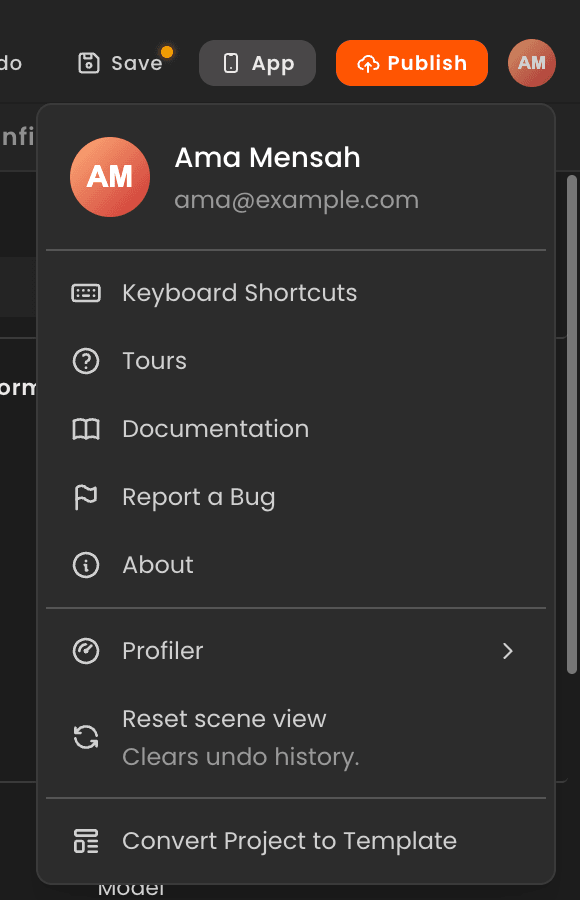
Click your avatar at the far right. The top of the menu shows the name and email you're signed in with.
| Item | What it does |
|---|---|
| Keyboard Shortcuts | Lists every shortcut. See also Keyboard shortcuts. |
| Tours | Opens the list of guided tours. See Tours. |
| Documentation | Opens these docs in your browser. |
| Report a Bug | Sends a bug report to the Relu Spatial team. |
| About | Shows which version of the editor you have. |
| Profiler | Point at it to open Profile build ("Play the real build, find the lag.") and Performance reports. See Profiler. |
| Reset scene view | Reloads the scene in the viewport. Use it if the viewport stops drawing properly. It clears your undo history. |
| Convert Project to Template | Turns this project into a project template. Only creator accounts see this item. See Browse and templates. |