

Sprite
Camera-facing 2D sprite. Unlike ImageComponent, sprites use THREE.Sprite and always render as billboards.
Editor inspector
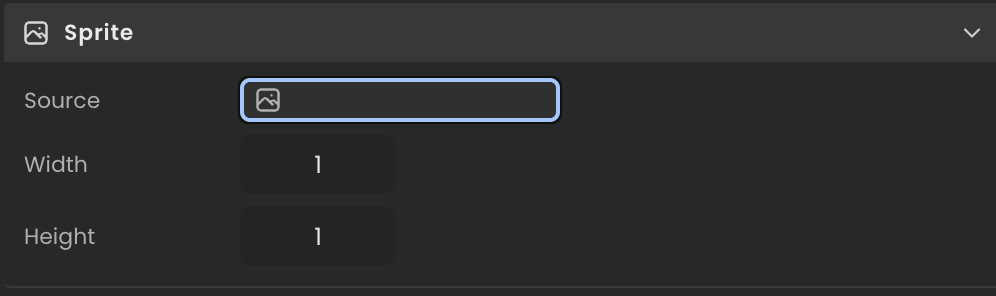
Properties
| Property | Type | Description |
|---|---|---|
path | string | Source URL or localasset:// path of the sprite image. |
width | number | Width of the sprite in world units. |
height | number | Height of the sprite in world units. |
texture | THREE.Texture | null | Loaded texture, populated asynchronously. null until loaded. |
object | THREE.Sprite | null | Live THREE.Sprite placed in the scene. null until built. |
API reference
- Class:
SpriteComponent - Source:
core/components/Sprite.ts
Scripting examples
Component access patterns
Use this.getComponent(X) to access a component on the entity this script is attached to. Use this.world.getEntityByName to find another entity by name, then this.world.getComponent to read its component:
// Component on the entity this script is on
const sprite = this.getComponent(SpriteComponent);

// Component on another entity, found by its scene name
const other = this.world.getEntityByName("Coin");
if (other) {
  const sprite = this.world.getComponent(other.entityId, SpriteComponent);
}
Pulse sprite size
Animate the sprite's width and height to create a breathing or highlight effect. The initial dimensions are captured on init so the pulse is relative to the authored size.
import { Behaviour } from "@relu-interactives/spatial-ecs";
import { SpriteComponent } from "@relu-interactives/spatial-ecs/components";
import type { FloatInput } from "@relu-interactives/spatial-ecs";

export default class SpritePulse extends Behaviour {
  data = {
    speed: 2 as FloatInput,
    amplitude: 0.2 as FloatInput,
  };

  private elapsed = 0;
  private baseWidth = 1;
  private baseHeight = 1;

  protected init() {
    const sprite = this.getComponent(SpriteComponent);
    if (sprite) {
      this.baseWidth = sprite.width;
      this.baseHeight = sprite.height;
    }
  }

  protected onUpdate() {
    this.elapsed += this.deltaTime;
    const sprite = this.getComponent(SpriteComponent);
    if (!sprite) return;

    const factor = 1 + this.data.amplitude * Math.sin(this.elapsed * this.data.speed);
    sprite.width = this.baseWidth * factor;
    sprite.height = this.baseHeight * factor;
  }
}
Toggle visibility on key press
Show or hide the sprite by toggling Object3DRef.visibility.
import { Behaviour, KeyboardKeys } from "@relu-interactives/spatial-ecs";
import { Object3DRef } from "@relu-interactives/spatial-ecs/components";

export default class SpriteToggle extends Behaviour {
  private visible = true;

  protected onUpdate() {
    if (this.world.getKeyDown(KeyboardKeys.V)) {
      this.visible = !this.visible;
      const ref = this.getComponent(Object3DRef);
      if (ref) ref.visibility = this.visible;
    }
  }
}
Via ComponentInput in the inspector
You can also pick this component from the inspector using a ComponentInput field. Assign any entity in the inspector and the field resolves to the live SpriteComponent instance at runtime.
import {
  Behaviour,
  type ComponentInput,
} from "@relu-interactives/spatial-ecs";
import {
  SpriteComponent,
} from "@relu-interactives/spatial-ecs/components";

export default class Example extends Behaviour {
  data = {
    targetSprite: {
      type: "component",
      value: null,
    } as unknown as ComponentInput,
  };

  protected onUpdate() {
    const sprite = this.data.targetSprite.value as SpriteComponent | null;
    if (!sprite) return;
    // Use the live component instance.
  }
}
Via EntityInput in the inspector
Alternatively, pick an entity from the inspector using an EntityInput field and then read the component off that entity via world.getComponent:
import {
  Behaviour,
  type EntityInput,
  type WorldEntityView,
} from "@relu-interactives/spatial-ecs";
import {
  SpriteComponent,
} from "@relu-interactives/spatial-ecs/components";

export default class Example extends Behaviour {
  data = {
    targetEntity: { type: "entity", value: null } as unknown as EntityInput,
  };

  protected onUpdate() {
    const entity = this.data.targetEntity.value as WorldEntityView | null;
    if (!entity) return;

    const sprite = this.world.getComponent(
      entity.entityId,
      SpriteComponent,
    ) as SpriteComponent | null;
    if (!sprite) return;
    // Use the component on the picked entity.
  }
}