

Mesh
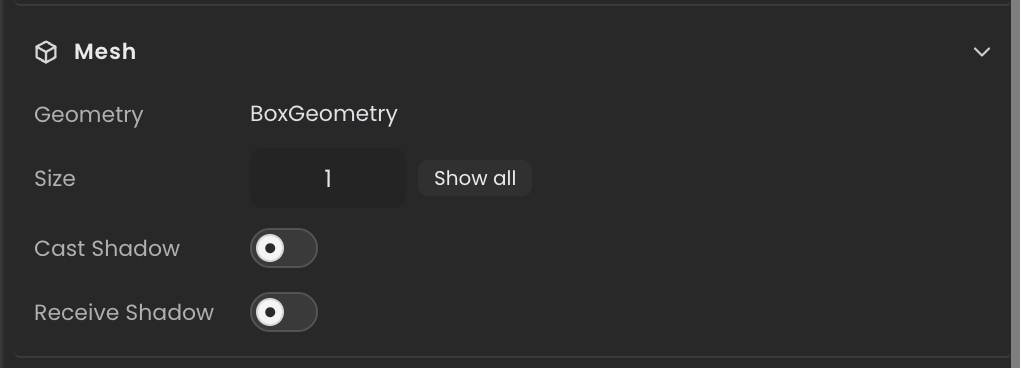
Holds the live three.js Object3D for an entity that renders as a primitive mesh (cube, sphere, plane, capsule, cylinder). For loaded GLTF/GLB models see ModelComponent; for the editable geometry parameters see MeshGeometryComponent.
Editor inspector
Properties
| Property | Type | Description |
|---|---|---|
mesh | THREE.Object3D | Underlying three.js mesh placed in the scene graph. |
API reference
- Class:
MeshComponent - Source:
core/components/Mesh.ts
Scripting examples
Component access patterns
Use this.getComponent(X) to access a component on the entity this script is attached to. Use this.world.getEntityByName to find another entity by name, then this.world.getComponent to read its component:
// Component on the entity this script is on
const mesh = this.getComponent(MeshComponent);

// Component on another entity, found by its scene name
const other = this.world.getEntityByName("Terrain");
if (other) {
  const mesh = this.world.getComponent(other.entityId, MeshComponent);
}
Toggle shadow casting on all sub-meshes
Walk the mesh hierarchy and enable or disable shadow casting based on a boolean inspector field.
import { Behaviour } from "@relu-interactives/spatial-ecs";
import { MeshComponent } from "@relu-interactives/spatial-ecs/components";
import type { ToggleInput } from "@relu-interactives/spatial-ecs";

export default class ShadowToggle extends Behaviour {
  data = {
    castShadow: true as ToggleInput,
    receiveShadow: true as ToggleInput,
  };

  protected onUpdate() {
    const mesh = this.getComponent(MeshComponent);
    if (!mesh?.mesh) return;

    mesh.mesh.traverse((child: any) => {
      if (child.isMesh) {
        child.castShadow = this.data.castShadow;
        child.receiveShadow = this.data.receiveShadow;
      }
    });
  }
}
Change vertex color or material on the raw mesh
Access the underlying THREE.Object3D directly for low-level material mutations that are not exposed through MaterialComponent.
import { Behaviour } from "@relu-interactives/spatial-ecs";
import { MeshComponent } from "@relu-interactives/spatial-ecs/components";
import type { ColorInput } from "@relu-interactives/spatial-ecs";

export default class MeshColorDriver extends Behaviour {
  data = {
    color: "#ffffff" as ColorInput,
  };

  protected onUpdate() {
    const mesh = this.getComponent(MeshComponent);
    if (!mesh?.mesh) return;

    mesh.mesh.traverse((child: any) => {
      if (child.isMesh && child.material?.color) {
        child.material.color.set(this.data.color);
      }
    });
  }
}
Prefer MaterialComponent for authored changes
For changes that should persist across save/reload, prefer MaterialComponent.updateValue() which keeps the serialised values[] in sync. Use MeshComponent.mesh for frame-by-frame visual effects only.
Via ComponentInput in the inspector
You can also pick this component from the inspector using a ComponentInput field. Assign any entity in the inspector and the field resolves to the live MeshComponent instance at runtime.
import {
  Behaviour,
  type ComponentInput,
} from "@relu-interactives/spatial-ecs";
import {
  MeshComponent,
} from "@relu-interactives/spatial-ecs/components";

export default class Example extends Behaviour {
  data = {
    targetMesh: {
      type: "component",
      value: null,
    } as unknown as ComponentInput,
  };

  protected onUpdate() {
    const mesh = this.data.targetMesh.value as MeshComponent | null;
    if (!mesh) return;
    // Use the live component instance.
  }
}
Via EntityInput in the inspector
Alternatively, pick an entity from the inspector using an EntityInput field and then read the component off that entity via world.getComponent:
import {
  Behaviour,
  type EntityInput,
  type WorldEntityView,
} from "@relu-interactives/spatial-ecs";
import {
  MeshComponent,
} from "@relu-interactives/spatial-ecs/components";

export default class Example extends Behaviour {
  data = {
    targetEntity: { type: "entity", value: null } as unknown as EntityInput,
  };

  protected onUpdate() {
    const entity = this.data.targetEntity.value as WorldEntityView | null;
    if (!entity) return;

    const mesh = this.world.getComponent(
      entity.entityId,
      MeshComponent,
    ) as MeshComponent | null;
    if (!mesh) return;
    // Use the component on the picked entity.
  }
}