

Design Docs
A design doc is a plan for your project that you and the agent write together before it builds anything: what the experience is, how it plays, what it looks and sounds like, and every asset it needs. Once you approve it, the agent builds from it, and it reads it again whenever it plans later work. It keeps big projects consistent and saves you from rebuilding things that weren't what you meant.
Design docs work for any kind of project, not only games.
Starting one
- Ask for something new and big. When you ask the agent for a whole new game or experience, it offers to design it first or just build it. Pick design, answer a few rounds of questions, and it writes the doc.
- For a project that already has content, the Agent tab shows This project has no design doc yet. Click Create design doc and the agent looks through your project, asks a few questions, and writes the doc from what's there. Not now hides the offer for this project.
- Any time, click the Design doc button at the top of the Agent tab to open the doc.
The Design Doc window
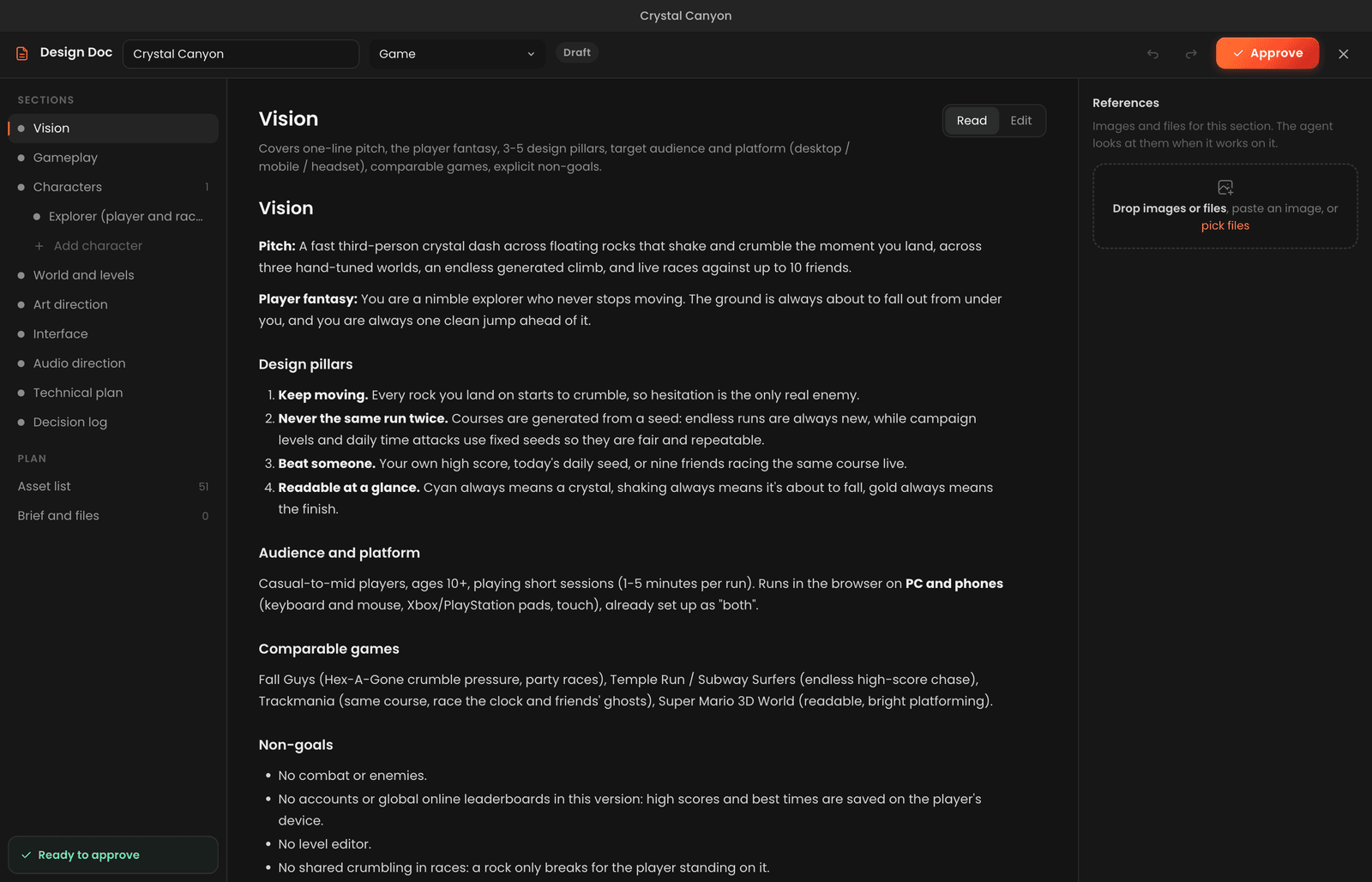
The doc opens over the whole editor. The list on the left has its pages:
| Page | What it covers |
|---|---|
| Vision | What it is, who it's for, the feeling you're after. |
| Gameplay | What the player does, the rules, how it's won or lost. |
| Characters | One page per character, each with a concept prompt for its picture. Add one with the + button. |
| World and levels | The places and how they connect. |
| Art direction | Style, colours, references. |
| Interface | Menus, HUD and screens. |
| Audio direction | Music and sound. |
| Technical plan | How it's built: devices, performance, multiplayer and so on. |
| Decision log | What was decided and why. |
| Asset list | Every model, texture, sound and effect the project needs. |
| Brief and files | Files for the whole project: a brief, a script, reference pictures. |
At the top, Kind of project sets what the doc is for: Game, Learning experience, Digital twin, Showcase or marketing or Something else. The page names follow it; for example, Gameplay becomes Learning experience for a learning project.
Each page is markdown. Switch between editing and the preview with Show preview / Hide preview. Your edits save as you type, and Undo and Redo at the top work across the doc.
References
Every page has a place to Drop images or files. On Art direction it's the Mood board: pictures that set the look, which the agent studies before it writes image prompts. Add a caption to say what to look at.
You can add pictures (PNG, JPG, WebP, GIF) and documents (text, markdown, CSV, JSON, HTML, RTF, Word, OpenDocument and PowerPoint), up to 25 MB each. PDFs are kept with the doc, but the agent can't read their text, so paste the text in too if it matters.
The asset list
A table of what the project needs. For each asset: its Kind (character, creature, prop, environment, texture, audio and so on), its Source (from your project, Sketchfab, AI generation, the Animation library, or a Primitive shape), its Status (Planned, In progress, In project, Dropped), what to look for or generate, and its path once it's in the project. Click Add asset to add a row. The agent marks assets done as it builds.
Approving
The doc starts as a Draft. Before it can be approved, a box lists anything still missing under Still to fix, such as a vision, gameplay, an art direction with at least three colours, a concept prompt for each character, or a source for each asset. Click a problem to jump to its page. When the list is empty it says Ready to approve.
When the agent finishes writing, it asks you to review. A box at the bottom of the doc asks "Anything to change?":
- Type what you want changed and click Request changes. The agent updates the doc and asks again.
- Click Approve and build and the agent starts building from the doc.
You can also click Approve at the top yourself. Changing the doc's text later reopens it as a draft, and Reopen does the same on purpose.
Where it's stored
The doc is saved in your project's docs/gdd/ folder, outside assets/, so it's never published with your game.