

AssetInput
A file picker that lets the user select an asset from the project's assets/ folder. The inspector renders a file browser button showing the selected filename.
Runtime value: { path: string; type: string } — read field.path.
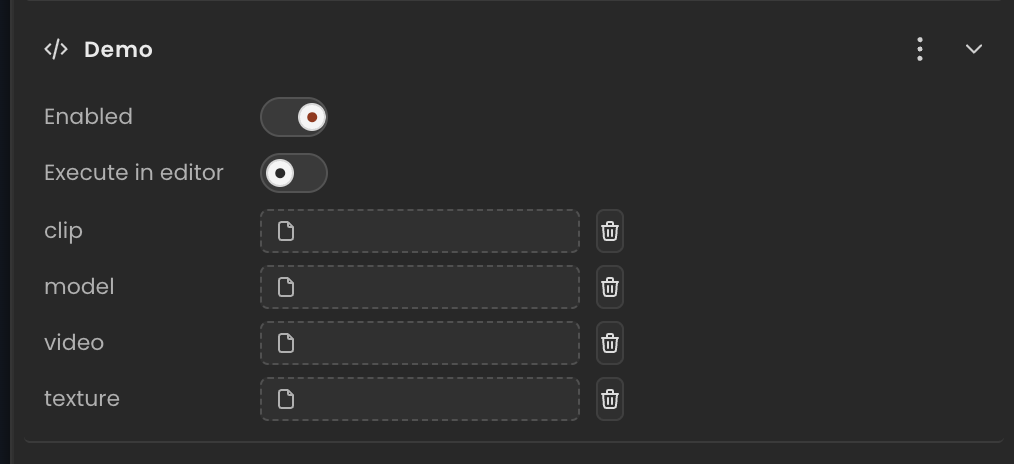
Declaration
Provide the type string to categorize the asset. Set path to an empty string for "no file selected".
ts
import { Behaviour, type AssetInput } from "@relu-interactives/spatial-ecs";

export default class Demo extends Behaviour {
  data = {
    clip:  { path: "", type: "audio" } as AssetInput,
    model: { path: "", type: "model" } as AssetInput,
    video: { path: "", type: "video" } as AssetInput,
    texture: { path: "", type: "image" } as AssetInput,
  };
}
IMPORTANT
Do not use type: "texture" or type: "texturemap" — the inspector treats those as a legacy URL text field rather than the asset file picker. Use "image" instead for image/texture assets.
Runtime usage
Read the .path property. Guard for an empty string (no file selected):
ts
init() {
  const path = this.data.clip.path;
  if (!path) return; // no file selected in the inspector
  console.log(path); // e.g. "./assets/sounds/click.mp3"
}
Common type values
type | Asset kind |
|---|---|
"audio" | Audio files (mp3, wav, ogg, …) |
"image" | Image files (png, jpg, webp, …) |
"model" | 3D model files (glb, gltf, …) |
"video" | Video files (mp4, webm, …) |
Notes
- The
typestring is for categorization only — it has no effect at runtime. pathis relative to the project root (e.g."./assets/audio/click.mp3").AssetInputprovides the path only. Load the asset yourself at runtime if needed.