

Transform
Position, rotation, and scale of an entity in its parent's local space. Rotation is stored in radians (Euler XYZ). The editor inspector converts to/from degrees for display — do not store degrees in this component. Mutations should go through the setPosition / setRotation / setScale helpers so dependent systems pick up the change.
Managed by:
TransformSyncSystem
Editor inspector
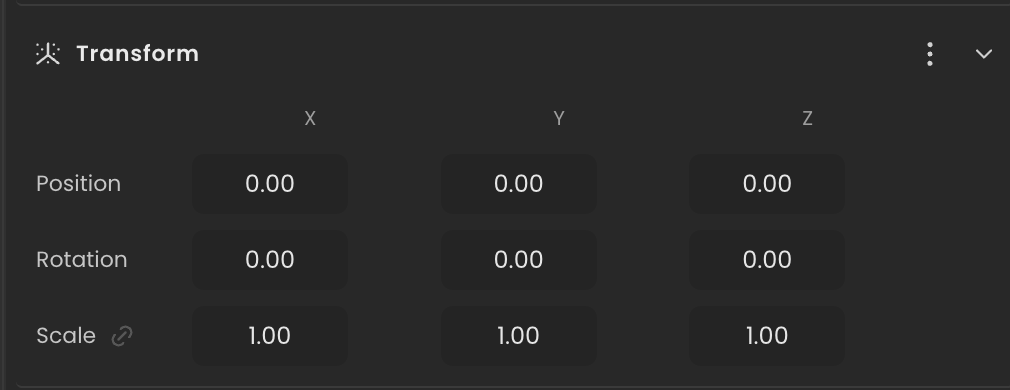
Properties
| Property | Type | Description |
|---|---|---|
position | Vec3 | Local position relative to the parent (or world if no parent). |
rotation | Vec3 | Local rotation as Euler XYZ in radians. |
scale | Vec3 | Local scale factors per axis (1 = identity). |
API reference
- Class:
TransformComponent - Source:
core/components/Transform.ts
Scripting examples
Component access patterns
Use this.getComponent(X) to access a component on the entity this script is attached to. Use this.world.getEntityByName to find another entity by name, then this.world.getComponent to read its component:
// Component on the entity this script is on
const transform = this.getComponent(TransformComponent);

// Component on another entity, found by its scene name
const other = this.world.getEntityByName("Target");
if (other) {
  const transform = this.world.getComponent(other.entityId, TransformComponent);
}
For TransformComponent specifically, this.transform is a built-in shorthand — the same component, no lookup needed.
Continuous rotation
Rotate an entity on any combination of axes at inspector-controlled speeds.
import { Behaviour } from "@relu-interactives/spatial-ecs";
import type { FloatInput } from "@relu-interactives/spatial-ecs";

export default class Rotator extends Behaviour {
  data = {
    speedX: 0 as FloatInput,
    speedY: 1 as FloatInput,
    speedZ: 0 as FloatInput,
  };

  protected onUpdate() {
    this.transform.rotation.x += this.data.speedX * this.deltaTime;
    this.transform.rotation.y += this.data.speedY * this.deltaTime;
    this.transform.rotation.z += this.data.speedZ * this.deltaTime;
  }
}
Sine-wave bobbing
Animate the entity's Y position with a configurable sine wave, useful for floating objects or UI indicators.
import { Behaviour } from "@relu-interactives/spatial-ecs";
import type { FloatInput } from "@relu-interactives/spatial-ecs";

export default class Bobber extends Behaviour {
  data = {
    amplitude: 0.5 as FloatInput,
    frequency: 1 as FloatInput,
  };

  private elapsed = 0;
  private originY = 0;

  protected init() {
    this.originY = this.transform.position.y;
  }

  protected onUpdate() {
    this.elapsed += this.deltaTime;
    this.transform.position.y =
      this.originY + Math.sin(this.elapsed * this.data.frequency) * this.data.amplitude;
  }
}
Via ComponentInput in the inspector
You can also pick this component from the inspector using a ComponentInput field. Assign any entity in the inspector and the field resolves to the live TransformComponent instance at runtime.
import {
  Behaviour,
  type ComponentInput,
} from "@relu-interactives/spatial-ecs";
import {
  TransformComponent,
} from "@relu-interactives/spatial-ecs/components";

export default class Example extends Behaviour {
  data = {
    targetTransform: {
      type: "component",
      value: null,
    } as unknown as ComponentInput,
  };

  protected onUpdate() {
    const transform = this.data.targetTransform.value as TransformComponent | null;
    if (!transform) return;
    // Use the live component instance.
  }
}
Via EntityInput in the inspector
Alternatively, pick an entity from the inspector using an EntityInput field and then read the component off that entity via world.getComponent:
import {
  Behaviour,
  type EntityInput,
  type WorldEntityView,
} from "@relu-interactives/spatial-ecs";
import {
  TransformComponent,
} from "@relu-interactives/spatial-ecs/components";

export default class Example extends Behaviour {
  data = {
    targetEntity: { type: "entity", value: null } as unknown as EntityInput,
  };

  protected onUpdate() {
    const entity = this.data.targetEntity.value as WorldEntityView | null;
    if (!entity) return;

    const transform = this.world.getComponent(
      entity.entityId,
      TransformComponent,
    ) as TransformComponent | null;
    if (!transform) return;
    // Use the component on the picked entity.
  }
}
Rotation units
Rotation is stored and mutated in radians. The editor inspector displays degrees — convert with Math.PI / 180 if you need to enter degree values in code.