

Behaviour Data Binding
The ScriptComponent.data field is the bridge between the editor inspector and your Behaviour subclass. Anything you place on data is:
- Saved with the project.
- Rendered as a live inspector control in the editor.
- Available at runtime as
this.datainside the script.
The type annotation on each field tells the editor which control to render. Import the input types from @relu-interactives/spatial-ecs and use them as as casts on the initial values in your data object.
Input types
| Type | Inspector control | Runtime value |
|---|---|---|
FloatInput | Number input | number |
TextInput | Text input | string |
ColorInput | Color picker | string (hex, e.g. "#ff0000") |
Vector2Input | XY number pair | { x: number; y: number } |
Vector3Input | XYZ number triple | { x: number; y: number; z: number } |
SliderInput | Range slider | { min, max, step, value } - read field.value at runtime |
DropdownInput | Select dropdown | { options: DropdownOption[]; value: string } - read field.value |
CheckboxInput | Checkbox | { type: "checkbox"; value: boolean } - read .value |
ToggleInput | Toggle switch | boolean |
AssetInput | Asset file picker | { path: string; type: string } - read field.path |
EntityInput | Entity picker | { type: "entity"; value: WorldEntityView | null } - read field.value |
ComponentInput | Entity + component picker | { type: "component"; componentKind?: ComponentKind; value: Component | null } - read field.value |
Declaring inspector fields
Import the input types you need alongside Behaviour, then declare them directly on the data class property using as casts:
import {
  Behaviour,
  type FloatInput,
  type TextInput,
  type ColorInput,
  type Vector2Input,
  type Vector3Input,
  type SliderInput,
  type DropdownInput,
  type CheckboxInput,
  type ToggleInput,
  type AssetInput,
  type EntityInput,
  type ComponentInput,
} from "@relu-interactives/spatial-ecs";

export default class Demo extends Behaviour {
  data = {
    speed:   1 as FloatInput,
    label:   "Hello" as TextInput,
    tint:    "#ffffff" as ColorInput,
    offset:  { x: 0, y: 0 } as Vector2Input,
    origin:  { x: 0, y: 0, z: 0 } as Vector3Input,
    range:   { min: 0, max: 10, step: 0.1, value: 5 } as SliderInput,
    axis: {
      value: "y",
      options: [
        { label: "X", value: "x" },
        { label: "Y", value: "y" },
        { label: "Z", value: "z" },
      ],
    } as DropdownInput,
    active:  true as ToggleInput,
    visible: { type: "checkbox", value: true } as CheckboxInput,
    texture: { path: "", type: "image" }   as AssetInput,
    target:  { type: "entity", value: null } as EntityInput,
    camera:  { type: "component", componentKind: "Camera", value: null } as ComponentInput,
  };
}
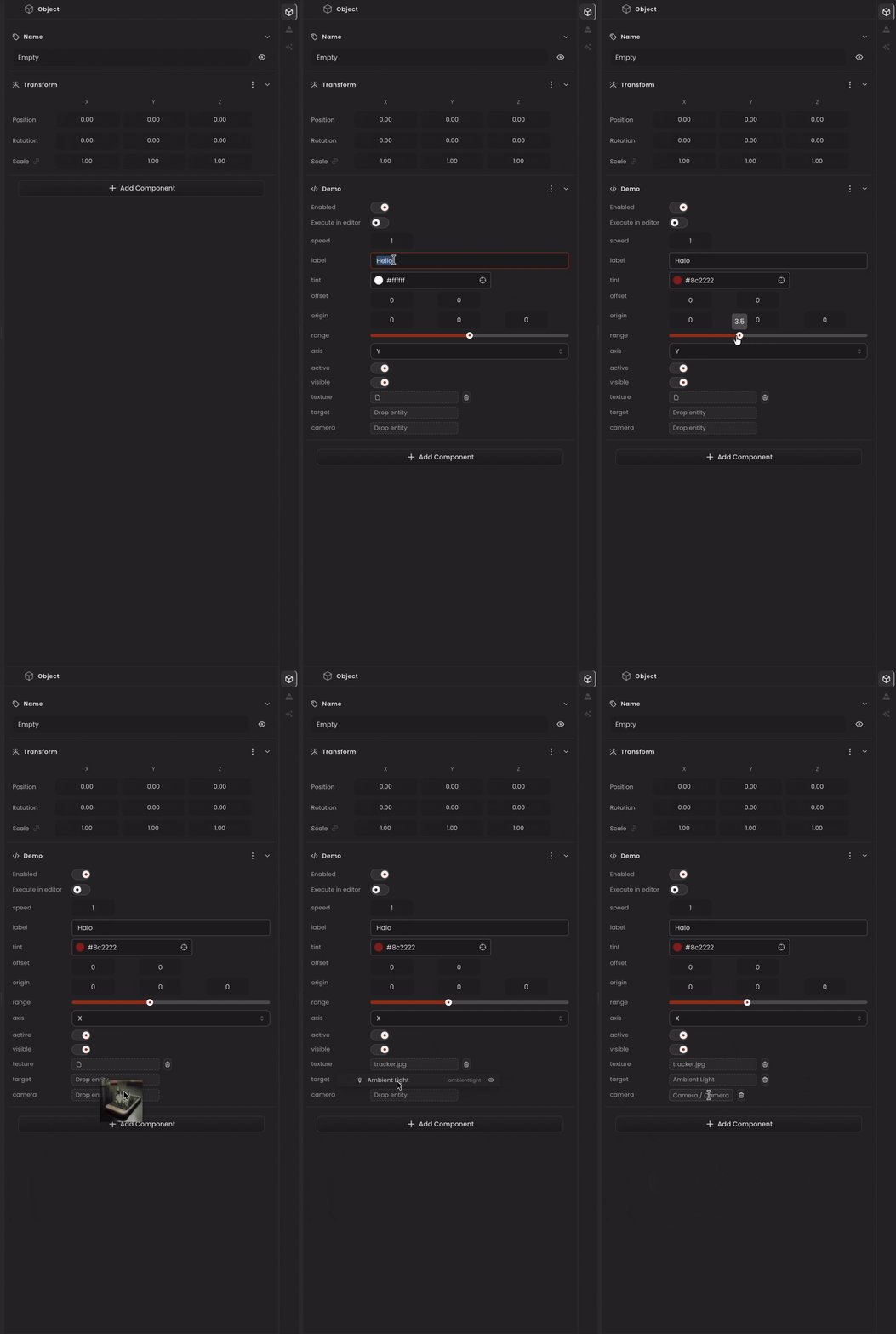
Each field in data maps directly to a live inspector control. The script above produces the following inspector panel:
Reading values at runtime
Most types map directly to their underlying primitive. The exceptions are SliderInput, DropdownInput, AssetInput, EntityInput, and ComponentInput - read the nested value:
onUpdate() {
  // Primitives — use directly
  this.transform.rotation.y += this.data.speed * this.deltaTime;

  // SliderInput → read .value
  const volume = this.data.range.value;

  // DropdownInput → read .value
  const axis = this.data.axis.value as "x" | "y" | "z";

  // AssetInput → read .path
  const src = this.data.texture.path;

  // EntityInput → cast to WorldEntityView | null
  const entity = this.data.target.value as WorldEntityView | null;

  // ComponentInput → cast to the concrete component type
  const cam = this.data.camera.value as CameraComponent | null;
}
Practical example (spinner with inspector controls)
import {
  Behaviour,
  type FloatInput,
  type ColorInput,
  type DropdownInput,
  type ToggleInput,
} from "@relu-interactives/spatial-ecs";

export default class Spinner extends Behaviour {
  data = {
    speed:   1 as FloatInput,
    color:   "#00aaff" as ColorInput,
    enabled: true as ToggleInput,
    axis: {
      value: "y",
      options: [
        { label: "X", value: "x" },
        { label: "Y", value: "y" },
        { label: "Z", value: "z" },
      ],
    } as DropdownInput,
  };

  onUpdate() {
    if (!this.data.enabled) return;
    const axis = this.data.axis.value as "x" | "y" | "z";
    this.transform.rotation[axis] += this.data.speed * this.deltaTime;
  }
}
Defaulting fields
Defaults are set inline on the data property. When a saved project reloads, saved values take precedence, the inline defaults only apply when a field has never been saved. This means:
- Adding a new field with an inline default is safe, existing saves will pick it up on next load.
- The inspector always has a valid initial value when the script is first attached.
- For
SliderInputandDropdownInput, the full object (includingoptions) must be present in the inline default, the editor readsoptionsto build the control.
Persistence
ScriptComponent.data is serialized and saved with the project. On reload, your data payload is restored verbatim. If you rename or restructure a field, migrate it inside init():
init() {
  // migrate renamed field
  if ((this.data as any).oldSpeed !== undefined) {
    this.data.speed = (this.data as any).oldSpeed;
    delete (this.data as any).oldSpeed;
  }
}