

Camera
Camera entity state. Supports perspective and orthographic projections, a 3d or ar runtime type, and an isDefault flag for the camera that the preview/editor renders through. Field-of-view, near/far, ortho frustum, and zoom are persisted; the live THREE.Camera is recreated when the project loads.
Managed by:
CameraSyncSystem
Editor inspector
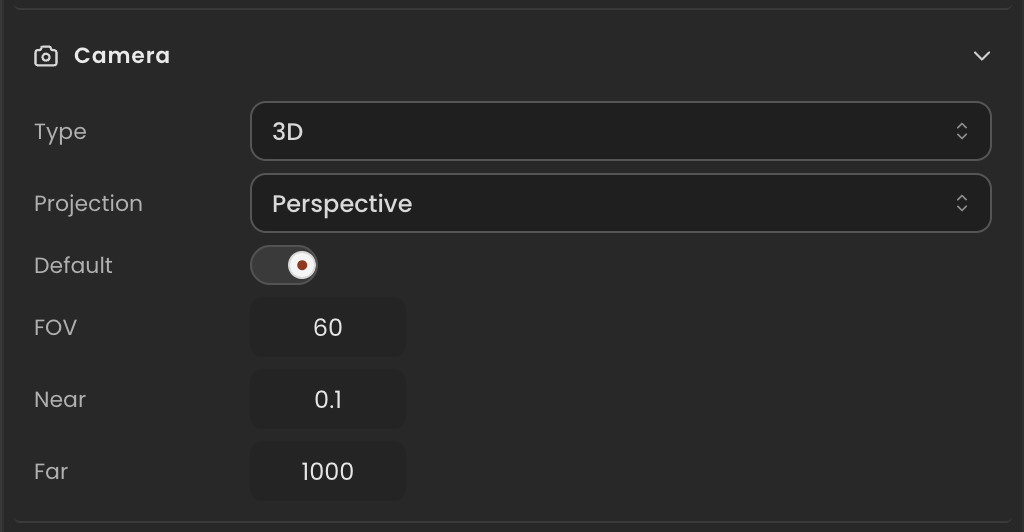
Properties
| Property | Type | Description |
|---|---|---|
camera | THREE.Camera | Live three.js camera. Recreated when the project loads to match projection. |
type | CameraRuntimeType | Runtime camera mode (3d or ar). |
isDefault | boolean | When true, this is the active rendering camera. Only one camera per scene should be the default. |
projection | CameraProjection | Active projection model (perspective or orthographic). |
fov | number | Vertical field of view in degrees. Used when projection is perspective. |
near | number | Near clip plane in world units. |
far | number | Far clip plane in world units. |
left | number | Left edge of the orthographic frustum (orthographic only). |
right | number | Right edge of the orthographic frustum (orthographic only). |
top | number | Top edge of the orthographic frustum (orthographic only). |
bottom | number | Bottom edge of the orthographic frustum (orthographic only). |
zoom | number | Zoom multiplier applied to the projection. |
API reference
- Class:
CameraComponent - Source:
core/components/Camera.ts
Scripting examples
Component access patterns
Use this.getComponent(X) to access a component on the entity this script is attached to. Use this.world.getEntityByName to find another entity by name, then this.world.getComponent to read its component:
// Component on the entity this script is on
const cam = this.getComponent(CameraComponent);

// Component on another entity, found by its scene name
const other = this.world.getEntityByName("CinematicCam");
if (other) {
  const cam = this.world.getComponent(other.entityId, CameraComponent);
}
Zoom with a hold key
Smoothly lerp the field-of-view toward a zoomed-in value while Shift is held, then lerp back out.
import { Behaviour, KeyboardKeys } from "@relu-interactives/spatial-ecs";
import { CameraComponent } from "@relu-interactives/spatial-ecs/components";
import type { FloatInput } from "@relu-interactives/spatial-ecs";

export default class CameraZoom extends Behaviour {
  data = {
    normalFov: 60 as FloatInput,
    zoomedFov: 30 as FloatInput,
    zoomSpeed: 5 as FloatInput,
  };

  protected onUpdate() {
    const cam = this.getComponent(CameraComponent);
    if (!cam) return;

    const targetFov = this.world.getKey(KeyboardKeys.ShiftLeft)
      ? this.data.zoomedFov
      : this.data.normalFov;

    cam.fov += (targetFov - cam.fov) * this.data.zoomSpeed * this.deltaTime;

    // Propagate the change to the live THREE.PerspectiveCamera
    const live = cam.camera as {
      isPerspectiveCamera?: boolean;
      fov?: number;
      updateProjectionMatrix?(): void;
    };
    if (live.isPerspectiveCamera && live.updateProjectionMatrix) {
      live.fov = cam.fov;
      live.updateProjectionMatrix();
    }
  }
}
Orbit the camera around a point
Rotate the camera entity's position around the scene origin at a configurable radius and height.
import { Behaviour } from "@relu-interactives/spatial-ecs";
import { CameraComponent } from "@relu-interactives/spatial-ecs/components";
import type { FloatInput } from "@relu-interactives/spatial-ecs";

export default class OrbitCamera extends Behaviour {
  data = {
    radius: 5 as FloatInput,
    height: 2 as FloatInput,
    speed: 0.5 as FloatInput,
  };

  private elapsed = 0;

  protected onUpdate() {
    const cam = this.getComponent(CameraComponent);
    if (!cam?.isDefault) return;

    this.elapsed += this.deltaTime;
    const angle = this.elapsed * this.data.speed;

    this.transform.position.x = Math.sin(angle) * this.data.radius;
    this.transform.position.y = this.data.height;
    this.transform.position.z = Math.cos(angle) * this.data.radius;

    // Always look toward the origin
    this.transform.rotation.y = -angle;
  }
}
Via ComponentInput in the inspector
You can also pick this component from the inspector using a ComponentInput field. Assign any entity in the inspector and the field resolves to the live CameraComponent instance at runtime.
import {
  Behaviour,
  type ComponentInput,
} from "@relu-interactives/spatial-ecs";
import {
  CameraComponent,
} from "@relu-interactives/spatial-ecs/components";

export default class Example extends Behaviour {
  data = {
    targetCamera: {
      type: "component",
      value: null,
    } as unknown as ComponentInput,
  };

  protected onUpdate() {
    const cam = this.data.targetCamera.value as CameraComponent | null;
    if (!cam) return;
    // Use the live component instance.
  }
}
Via EntityInput in the inspector
Alternatively, pick an entity from the inspector using an EntityInput field and then read the component off that entity via world.getComponent:
import {
  Behaviour,
  type EntityInput,
  type WorldEntityView,
} from "@relu-interactives/spatial-ecs";
import {
  CameraComponent,
} from "@relu-interactives/spatial-ecs/components";

export default class Example extends Behaviour {
  data = {
    targetEntity: { type: "entity", value: null } as unknown as EntityInput,
  };

  protected onUpdate() {
    const entity = this.data.targetEntity.value as WorldEntityView | null;
    if (!entity) return;

    const cam = this.world.getComponent(
      entity.entityId,
      CameraComponent,
    ) as CameraComponent | null;
    if (!cam) return;
    // Use the component on the picked entity.
  }
}