

Animation
Animation catalog and runtime state for an entity. Combines clips imported from a model with externally added clips, exposes a state machine for named transitions, and is queried each frame by the animation system to advance mixer time. Use the addState / switchState helpers rather than mutating the state machine directly so the animation system observes transitions.
Managed by:
AnimationSystem
Editor inspector
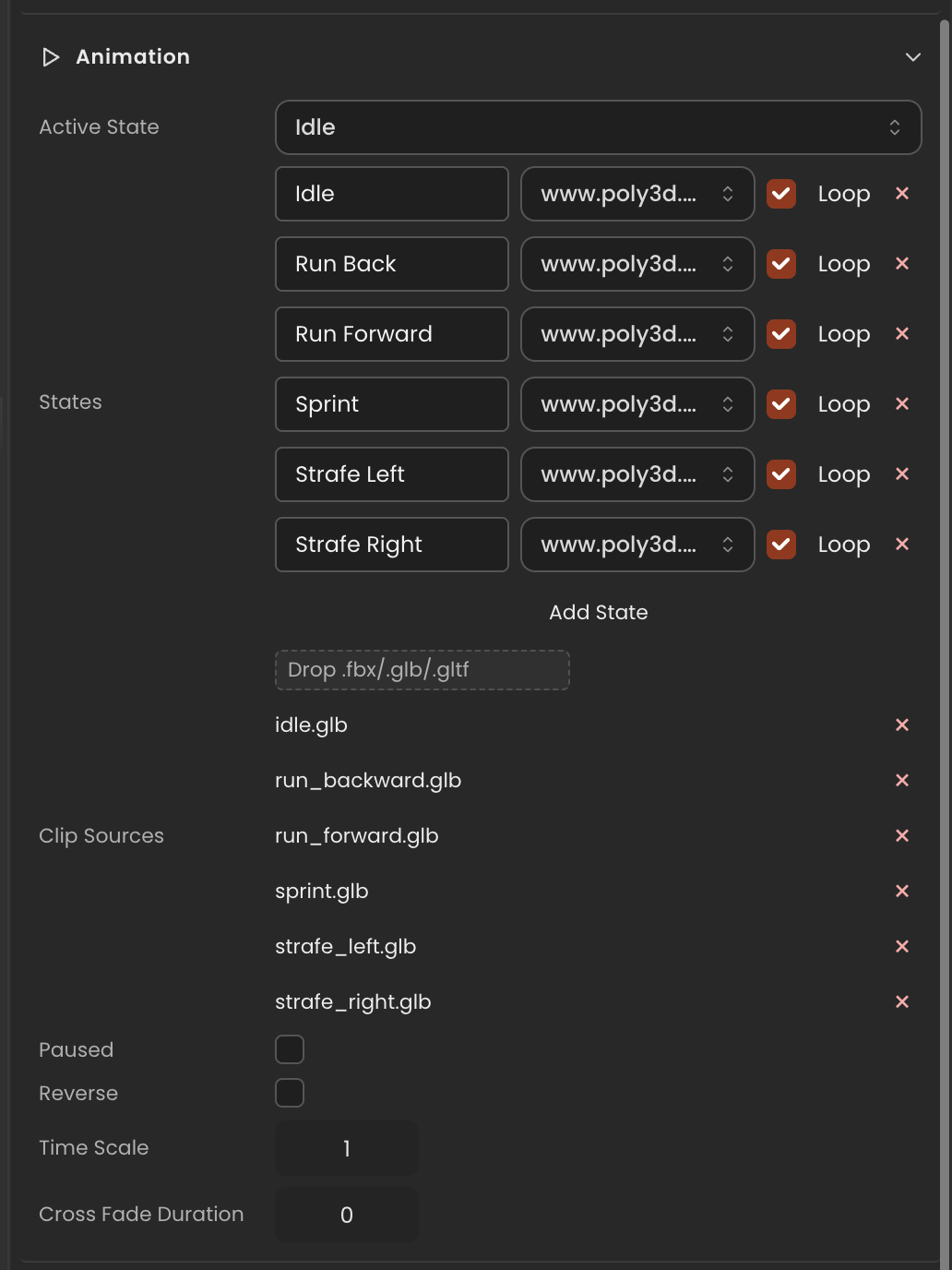
Properties
| Property | Type | Description |
|---|---|---|
clips | THREE.AnimationClip[] | Combined ordered list of clips (model + external) currently loaded. |
clipCatalog | AnimationClipCatalogEntry[] | Per-clip metadata used by the inspector. |
availableClips | string[] | Display names of clips available for state-machine bindings. |
externalClipSources | string[] | URLs/paths of external clip sources (saved with the project). |
paused | boolean | Whether playback is currently paused. |
reverse | boolean | Play the active clip in reverse. |
timeScale | number | Playback speed multiplier (1 = real-time). |
crossFadeDuration | number | Default cross-fade duration in seconds when switching states. |
states | AnimationStateMachine[] | All state-machine entries authored on this entity. |
active | AnimationStateMachine | null | State currently being played, or null if none. |
activeStateName | string | null | Name of the active state, or null if none. |
stateManager | AnimationStateManager | Manager that drives state transitions; mutate via addState/switchState. |
API reference
- Class:
AnimationComponent - Source:
core/components/Animation.ts
Scripting examples
Component access patterns
Use this.getComponent(X) to access a component on the entity this script is attached to. Use this.world.getEntityByName to find another entity by name, then this.world.getComponent to read its component:
// Component on the entity this script is on
const anim = this.getComponent(AnimationComponent);

// Component on another entity, found by its scene name
const other = this.world.getEntityByName("Character");
if (other) {
  const anim = this.world.getComponent(other.entityId, AnimationComponent);
}
Switch states on keyboard input
Transition between an idle and a walk state based on arrow-key input. The cross-fade duration is set from the inspector.
import { Behaviour, KeyboardKeys } from "@relu-interactives/spatial-ecs";
import { AnimationComponent } from "@relu-interactives/spatial-ecs/components";
import type { TextInput, FloatInput } from "@relu-interactives/spatial-ecs";

export default class AnimationController extends Behaviour {
  data = {
    idleState: "Idle" as TextInput,
    walkState: "Walk" as TextInput,
    crossFadeDuration: 0.3 as FloatInput,
  };

  protected init() {
    const anim = this.getComponent(AnimationComponent);
    if (anim) {
      anim.crossFadeDuration = this.data.crossFadeDuration;
      anim.switchState(this.data.idleState);
    }
  }

  protected onUpdate() {
    const anim = this.getComponent(AnimationComponent);
    if (!anim) return;

    const moving =
      this.world.getKey(KeyboardKeys.ArrowUp) || this.world.getKey(KeyboardKeys.ArrowDown);
    const target = moving ? this.data.walkState : this.data.idleState;

    if (anim.activeStateName !== target) {
      anim.switchState(target);
    }
  }
}
Control playback speed and pause
Drive timeScale and paused live from inspector fields, useful for slow-motion or freeze effects.
import { Behaviour } from "@relu-interactives/spatial-ecs";
import { AnimationComponent } from "@relu-interactives/spatial-ecs/components";
import type { FloatInput, ToggleInput } from "@relu-interactives/spatial-ecs";

export default class AnimationSpeedDriver extends Behaviour {
  data = {
    timeScale: 1 as FloatInput,
    paused: false as ToggleInput,
  };

  protected onUpdate() {
    const anim = this.getComponent(AnimationComponent);
    if (!anim) return;
    anim.timeScale = this.data.timeScale;
    anim.paused = this.data.paused;
  }
}
State machine
Always use anim.switchState(name) to change the active clip — do not assign to active directly. This ensures the animation system observes the transition and applies the configured cross-fade.
⚠️ addState — positional args only (critical)
addState takes three positional arguments: (name, clipRef, loop). Passing an object will silently resolve nothing because resolveClipRef won't find a clip named [object Object].
// ✅ Correct — positional args
anim.addState("Walk", "Walk", true);
anim.addState("Attack", "Attack", false);

// ❌ Wrong — object arg; the clip will never resolve
anim.addState({ name: "Walk", clip: "Walk", loop: true }); // ← broken
Typical deferred setup (model may not be loaded yet)
Guard on availableClips.length > 0 inside onUpdate until the model is ready, then register states once:
import { Behaviour } from "@relu-interactives/spatial-ecs";
import { AnimationComponent } from "@relu-interactives/spatial-ecs/components";

export default class AnimSetup extends Behaviour {
  private ready = false;

  protected onUpdate() {
    if (this.ready) return;
    const anim = this.getComponent(AnimationComponent);
    if (!anim || anim.availableClips.length === 0) return;

    const c = anim.availableClips;
    if (c.includes("Walk"))   anim.addState("Walk",   "Walk",   true);
    if (c.includes("Run"))    anim.addState("Run",    "Run",    true);
    if (c.includes("Attack")) anim.addState("Attack", "Attack", false);
    anim.crossFadeDuration = 0.25;
    anim.switchState("Walk");
    this.ready = true;
  }
}
Via ComponentInput in the inspector
You can also pick this component from the inspector using a ComponentInput field. Assign any entity in the inspector and the field resolves to the live AnimationComponent instance at runtime.
import {
  Behaviour,
  type ComponentInput,
} from "@relu-interactives/spatial-ecs";
import {
  AnimationComponent,
} from "@relu-interactives/spatial-ecs/components";

export default class Example extends Behaviour {
  data = {
    targetAnimation: {
      type: "component",
      value: null,
    } as unknown as ComponentInput,
  };

  protected onUpdate() {
    const anim = this.data.targetAnimation.value as AnimationComponent | null;
    if (!anim) return;
    // Use the live component instance.
  }
}
Via EntityInput in the inspector
Alternatively, pick an entity from the inspector using an EntityInput field and then read the component off that entity via world.getComponent:
import {
  Behaviour,
  type EntityInput,
  type WorldEntityView,
} from "@relu-interactives/spatial-ecs";
import {
  AnimationComponent,
} from "@relu-interactives/spatial-ecs/components";

export default class Example extends Behaviour {
  data = {
    targetEntity: { type: "entity", value: null } as unknown as EntityInput,
  };

  protected onUpdate() {
    const entity = this.data.targetEntity.value as WorldEntityView | null;
    if (!entity) return;

    const anim = this.world.getComponent(
      entity.entityId,
      AnimationComponent,
    ) as AnimationComponent | null;
    if (!anim) return;
    // Use the component on the picked entity.
  }
}