

Image Target
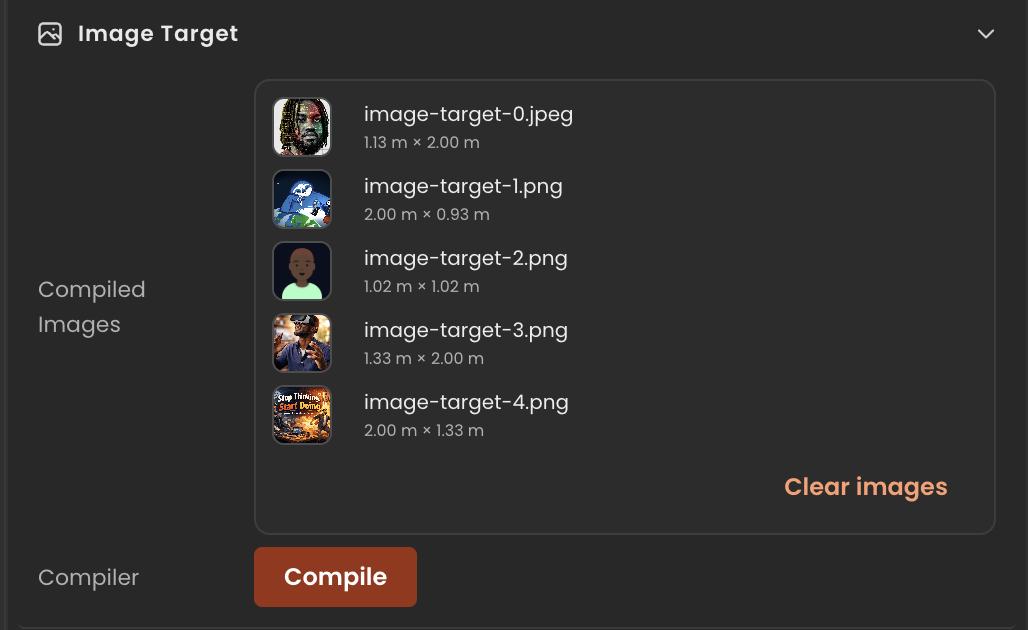
Image-tracking target metadata used by AR projects. Holds the source images users uploaded plus the URL of the compiled .mind target file produced by the image-target compiler. Pair with ImageTargetAnchor on child entities that should appear when the target is detected.
Editor inspector
Properties
| Property | Type | Description |
|---|---|---|
targets | ImageTargetReference[] | Source images that were combined into the compiled .mind target. |
compiledTargetUrl | string | URL of the compiled .mind target file. Set after the image-target compiler finishes. |
compiledTargetDir | string | Directory containing the compiled .mind file (desktop projects). |
texture | THREE.Texture | null | Optional preview texture used in the editor viewport. null when not assigned. |
object | THREE.Object3D | null | Optional preview object placed in the editor viewport. null when not assigned. |
API reference
- Class:
ImageTarget - Source:
core/components/ImageTarget.ts
Scripting examples
Component access patterns
Use this.getComponent(X) to access a component on the entity this script is attached to. Use this.world.getEntityByName to find another entity by name, then this.world.getComponent to read its component:
// Component on the entity this script is on
const target = this.getComponent(ImageTarget);

// Component on another entity, found by its scene name
const other = this.world.getEntityByName("CardMarker");
if (other) {
  const target = this.world.getComponent(other.entityId, ImageTarget);
}
React to target found / lost events
The image-tracking system reveals the entity when its target is detected and hides it when lost. Attach this script to a child entity that has ImageTargetAnchor to run logic on those transitions.
import { Behaviour } from "@relu-interactives/spatial-ecs";
import { Object3DRef, AudioComponent } from "@relu-interactives/spatial-ecs/components";

export default class TargetFoundReactor extends Behaviour {
  onTargetFound() {
    // Play audio, trigger animation, spawn objects, etc.
    const audio = this.getComponent(AudioComponent);
    audio?.play();
  }

  onTargetLost() {
    const audio = this.getComponent(AudioComponent);
    audio?.stop();
  }
}
AR-only component
ImageTarget and ImageTargetAnchor are specific to image-tracking AR projects. The tracking system only runs in preview; behaviour scripts attached to anchor entities will still initialise in the editor, but Object3DRef.visibility will remain as authored until a real target is detected at runtime.
Via ComponentInput in the inspector
You can also pick this component from the inspector using a ComponentInput field. Assign any entity in the inspector and the field resolves to the live ImageTarget instance at runtime.
import {
  Behaviour,
  type ComponentInput,
} from "@relu-interactives/spatial-ecs";
import {
  ImageTarget,
} from "@relu-interactives/spatial-ecs/components";

export default class Example extends Behaviour {
  data = {
    targetImageTarget: {
      type: "component",
      value: null,
    } as unknown as ComponentInput,
  };

  protected onUpdate() {
    const imageTarget = this.data.targetImageTarget.value as ImageTarget | null;
    if (!imageTarget) return;
    // Use the live component instance.
  }
}
Via EntityInput in the inspector
Alternatively, pick an entity from the inspector using an EntityInput field and then read the component off that entity via world.getComponent:
import {
  Behaviour,
  type EntityInput,
  type WorldEntityView,
} from "@relu-interactives/spatial-ecs";
import {
  ImageTarget,
} from "@relu-interactives/spatial-ecs/components";

export default class Example extends Behaviour {
  data = {
    targetEntity: { type: "entity", value: null } as unknown as EntityInput,
  };

  protected onUpdate() {
    const entity = this.data.targetEntity.value as WorldEntityView | null;
    if (!entity) return;

    const imageTarget = this.world.getComponent(
      entity.entityId,
      ImageTarget,
    ) as ImageTarget | null;
    if (!imageTarget) return;
    // Use the component on the picked entity.
  }
}