

Material
Material catalog for an entity. Tracks the live three.js materials (materials, material) plus serialized authoring state (values[]) mirrored from the inspector. Supports standard, basic, phong, and physical PBR types with optional texture map slots. Use setMaterials, updateValue, setMaterialType, setTextureFiltering, and setUseMipmaps to mutate state — these keep values[] and the live three.js materials in sync. Texture URLs use the localasset:// protocol inside the editor.
Shared material assets (editor)
The editor can link a material slot to a material asset (a .material file in the project's asset browser) via the assetRefs field — one entry per slot, holding the asset's localasset:// URL or null for a local material. The editor materializes the asset's values into values[] and re-applies them to every linked entity whenever the asset is edited. Rendering and the published runtime read only values[]; assetRefs is editor bookkeeping that persists with the project.
Managed by:
MaterialSyncSystem
Editor inspector
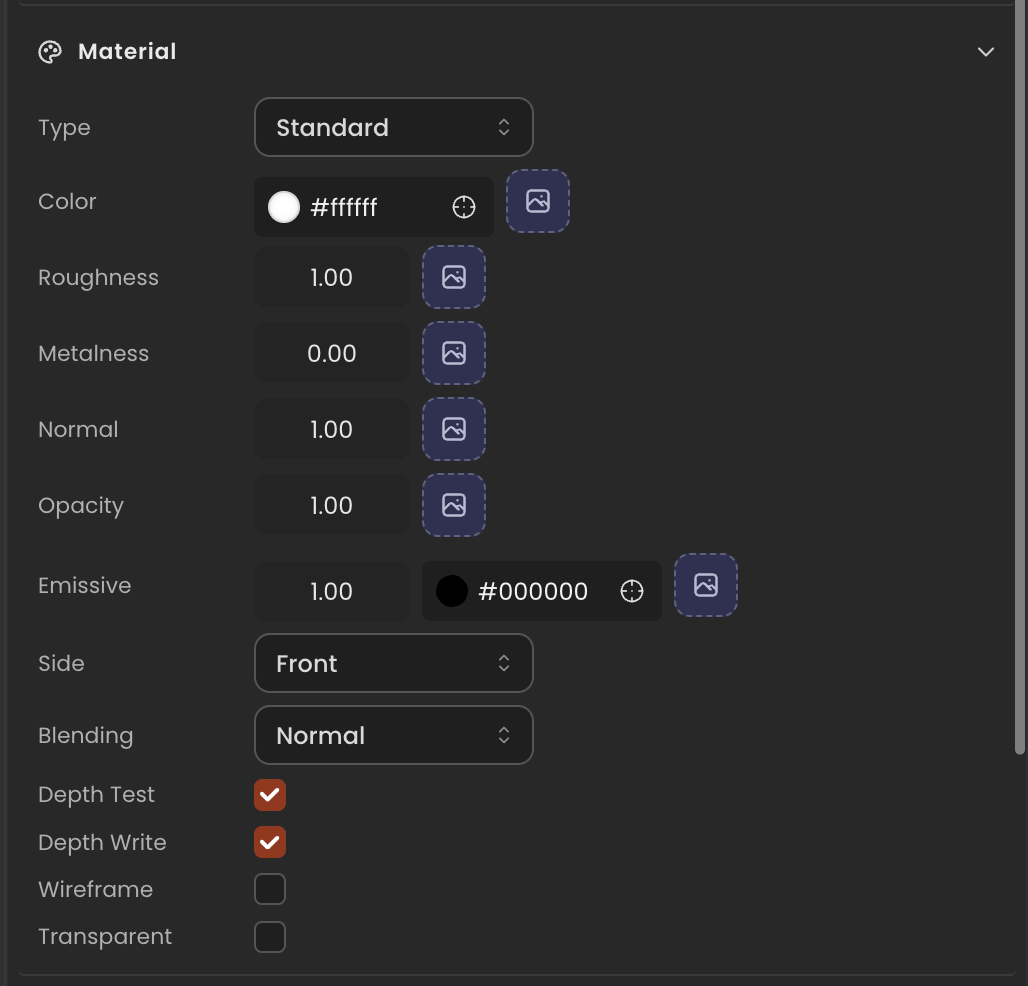
Properties
| Property | Type | Description |
|---|---|---|
materials | THREE.Material[] | Live three.js materials currently bound to the entity's mesh (one per submesh). |
material | THREE.Material | null | Convenience reference to materials[0]. null when no material is assigned. |
values | MaterialValueState[] | Serialized authoring state (one entry per material in materials). Saved with the project. |
assetRefs | (string | null)[] | Editor-managed material-asset linkage, one entry per slot (parallel to values). A localasset:// URL of a .material asset file, or null/absent for a local (unlinked) material. The editor materializes the asset's values into values and keeps them in sync when the asset is edited — rendering and the runtime read only values and ignore this field. Saved with the project; survives material rebinds. |
API reference
- Class:
MaterialComponent - Source:
core/components/Material.ts
Scripting examples
Component access patterns
Use this.getComponent(X) to access a component on the entity this script is attached to. Use this.world.getEntityByName to find another entity by name, then this.world.getComponent to read its component:
// Component on the entity this script is on
const mat = this.getComponent(MaterialComponent);

// Component on another entity, found by its scene name
const other = this.world.getEntityByName("Wall");
if (other) {
  const mat = this.world.getComponent(other.entityId, MaterialComponent);
}
Fade opacity with a sine wave
Animate material transparency to create a pulsing ghost or reveal effect. Use updateValue so the state persists in the ECS snapshot — MaterialSyncSystem applies it to the live material each frame.
import { Behaviour } from "@relu-interactives/spatial-ecs";
import { MaterialComponent } from "@relu-interactives/spatial-ecs/components";
import type { FloatInput } from "@relu-interactives/spatial-ecs";

export default class MaterialFade extends Behaviour {
  data = {
    speed: 1 as FloatInput,
  };

  private elapsed = 0;

  protected onUpdate() {
    this.elapsed += this.deltaTime;
    const mat = this.getComponent(MaterialComponent);
    if (!mat) return;

    const opacity = (Math.sin(this.elapsed * this.data.speed) + 1) * 0.5;
    mat.updateValue(0, { transparent: true });
    mat.updateValue(0, { opacity: opacity });
  }
}
Transient vs persistent opacity
mat.updateValue(0, { opacity: value }) keeps values[] in sync with the live material — changes survive a project reload.
Mutating mat.material?.opacity directly can work for transient visual-only effects, but MaterialSyncSystem may overwrite it when other material properties change. Prefer updateValue for any state you want to persist.
Change material color at runtime
Let the inspector drive the diffuse color live without restarting the scene.
import { Behaviour } from "@relu-interactives/spatial-ecs";
import { MaterialComponent } from "@relu-interactives/spatial-ecs/components";
import type { ColorInput } from "@relu-interactives/spatial-ecs";

export default class MaterialColorDriver extends Behaviour {
  data = {
    color: "#ff0000" as ColorInput,
  };

  private _prev: string | null = null;

  protected onUpdate() {
    // Guard — only call updateValue when the color actually changes
    if (this.data.color === this._prev) return;
    this._prev = this.data.color;

    const mat = this.getComponent(MaterialComponent);
    if (!mat) return;
    mat.updateValue(0, { color: this.data.color });
  }
}
Material sync
updateValue(index, key, value) writes to values[] (persisted with the project) and lets MaterialSyncSystem apply the change to the live THREE.js material. Mutating material.color or other THREE.js properties directly is not saved with the project.
Via ComponentInput in the inspector
You can also pick this component from the inspector using a ComponentInput field. Assign any entity in the inspector and the field resolves to the live MaterialComponent instance at runtime.
import {
  Behaviour,
  type ComponentInput,
} from "@relu-interactives/spatial-ecs";
import {
  MaterialComponent,
} from "@relu-interactives/spatial-ecs/components";

export default class Example extends Behaviour {
  data = {
    targetMaterial: {
      type: "component",
      value: null,
    } as unknown as ComponentInput,
  };

  protected onUpdate() {
    const mat = this.data.targetMaterial.value as MaterialComponent | null;
    if (!mat) return;
    // Use the live component instance.
  }
}
Via EntityInput in the inspector
Alternatively, pick an entity from the inspector using an EntityInput field and then read the component off that entity via world.getComponent:
import {
  Behaviour,
  type EntityInput,
  type WorldEntityView,
} from "@relu-interactives/spatial-ecs";
import {
  MaterialComponent,
} from "@relu-interactives/spatial-ecs/components";

export default class Example extends Behaviour {
  data = {
    targetEntity: { type: "entity", value: null } as unknown as EntityInput,
  };

  protected onUpdate() {
    const entity = this.data.targetEntity.value as WorldEntityView | null;
    if (!entity) return;

    const mat = this.world.getComponent(
      entity.entityId,
      MaterialComponent,
    ) as MaterialComponent | null;
    if (!mat) return;
    // Use the component on the picked entity.
  }
}