

Light
Light source attached to an entity. type selects the underlying three.js light class (directional, point, spot, ambient, hemisphere, rect-area). values carries authoring state including color, intensity, and type-specific fields (distance, decay, angle, penumbra, width, height).
Managed by:
LightSyncSystem
Editor inspector
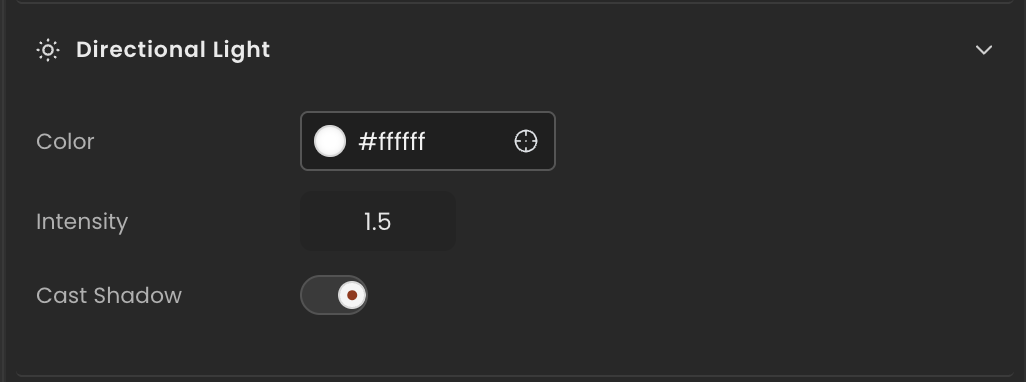
Properties
| Property | Type | Description |
|---|---|---|
light | THREE.Light | Live three.js light placed in the scene. Recreated when the project loads. |
type | string | Three.js class name of the light (e.g. "DirectionalLight", "PointLight", "SpotLight"). |
values | LightValueState | Serialized authoring state. Saved with the project. |
API reference
- Class:
LightComponent - Source:
core/components/Light.ts
Scripting examples
Component access patterns
Use this.getComponent(X) to access a component on the entity this script is attached to. Use this.world.getEntityByName to find another entity by name, then this.world.getComponent to read its component:
// Component on the entity this script is on
const light = this.getComponent(LightComponent);

// Component on another entity, found by its scene name
const other = this.world.getEntityByName("SpotLight");
if (other) {
  const light = this.world.getComponent(other.entityId, LightComponent);
}
Pulse intensity
Animate the light's intensity between a min and max value using a sine wave — useful for flickering flames or heartbeat effects.
import { Behaviour } from "@relu-interactives/spatial-ecs";
import { LightComponent } from "@relu-interactives/spatial-ecs/components";
import type { FloatInput } from "@relu-interactives/spatial-ecs";

export default class LightPulse extends Behaviour {
  data = {
    speed: 2 as FloatInput,
    minIntensity: 0.5 as FloatInput,
    maxIntensity: 3 as FloatInput,
  };

  private elapsed = 0;

  protected onUpdate() {
    this.elapsed += this.deltaTime;
    const light = this.getComponent(LightComponent);
    if (!light?.light) return;

    const t = (Math.sin(this.elapsed * this.data.speed) + 1) * 0.5;
    light.light.intensity =
      this.data.minIntensity + t * (this.data.maxIntensity - this.data.minIntensity);
  }
}
Timed color shift
Cycle the light's color through the RGB spectrum over a configurable period.
import { Behaviour } from "@relu-interactives/spatial-ecs";
import { LightComponent } from "@relu-interactives/spatial-ecs/components";
import type { FloatInput } from "@relu-interactives/spatial-ecs";

export default class LightColorCycle extends Behaviour {
  data = {
    period: 4 as FloatInput,
  };

  private elapsed = 0;

  protected onUpdate() {
    this.elapsed += this.deltaTime;
    const light = this.getComponent(LightComponent);
    if (!light?.light) return;

    const hue = (this.elapsed / this.data.period) % 1;
    (light.light.color as { setHSL(h: number, s: number, l: number): void })
      .setHSL(hue, 1, 0.5);
  }
}
Tune shadow quality
three's shadow defaults suit a small demo: a 512 × 512 shadow map, and for a directional light a shadow camera that only covers a 10 m square around the light's target. In a larger level, shadows past that square vanish and the ones inside look blocky. Set values.shadow to fix both:
import { Behaviour } from "@relu-interactives/spatial-ecs";
import { LightComponent } from "@relu-interactives/spatial-ecs/components";

export default class SunShadows extends Behaviour {
  init() {
    const light = this.getComponent(LightComponent);
    if (!light) return;

    light.setValues({
      castShadow: true,
      shadow: {
        mapSize: 2048,     // texels per side; sharper but costs GPU memory
        cameraSize: 25,    // directional only: covers a 50 m square
        near: 0.5,
        far: 120,
        bias: -0.0005,     // removes "shadow acne" stripes
        normalBias: 0.02,  // helps on large flat floors
        radius: 2,         // softer edges (PCF shadow maps)
      },
    });
  }
}
LightSyncSystem writes only the fields you provide and leaves the rest at three's defaults. A light with no shadow block keeps every default. If you remove a field later, it returns to its default.
| Field | Applies to | Notes |
|---|---|---|
mapSize | directional, spot, point | Square shadow map size, clamped to 16 to 8192. Changing it frees the old map; three rebuilds it next frame. |
bias | directional, spot, point | Small negative values such as -0.0005 remove acne. Too large and shadows detach from objects. |
normalBias | directional, spot, point | Offsets along the surface normal. 0.02 to 0.05 works for big flat surfaces. |
radius | directional, spot, point | Edge blur for PCF shadow maps. |
cameraSize | directional | Half-width of the orthographic shadow box. Make it just large enough to cover the play area; a bigger box spreads the same texels thinner. |
near, far | directional, spot, point | Shadow camera clip planes. A spot light with a non-zero distance uses that distance as its far plane. |
The light must also have castShadow: true, and the meshes need castShadow / receiveShadow on their MeshGeometryComponent. Directional lights spawn with castShadow on.
Live light access
Mutate light.light.intensity and light.light.color directly for immediate per-frame changes. For changes that should survive a save/reload cycle, also update light.values.intensity / light.values.color so the authoring state stays in sync.
Via ComponentInput in the inspector
You can also pick this component from the inspector using a ComponentInput field. Assign any entity in the inspector and the field resolves to the live LightComponent instance at runtime.
import {
  Behaviour,
  type ComponentInput,
} from "@relu-interactives/spatial-ecs";
import {
  LightComponent,
} from "@relu-interactives/spatial-ecs/components";

export default class Example extends Behaviour {
  data = {
    targetLight: {
      type: "component",
      value: null,
    } as unknown as ComponentInput,
  };

  protected onUpdate() {
    const light = this.data.targetLight.value as LightComponent | null;
    if (!light) return;
    // Use the live component instance.
  }
}
Via EntityInput in the inspector
Alternatively, pick an entity from the inspector using an EntityInput field and then read the component off that entity via world.getComponent:
import {
  Behaviour,
  type EntityInput,
  type WorldEntityView,
} from "@relu-interactives/spatial-ecs";
import {
  LightComponent,
} from "@relu-interactives/spatial-ecs/components";

export default class Example extends Behaviour {
  data = {
    targetEntity: { type: "entity", value: null } as unknown as EntityInput,
  };

  protected onUpdate() {
    const entity = this.data.targetEntity.value as WorldEntityView | null;
    if (!entity) return;

    const light = this.world.getComponent(
      entity.entityId,
      LightComponent,
    ) as LightComponent | null;
    if (!light) return;
    // Use the component on the picked entity.
  }
}