

Audio
Plays an audio clip from path. Supports both global stereo (positional: false) and 3D positional audio with the configured distance model. Runtime fields (object, audio, isPlaying, isPaused) are recreated when the project loads and are never persisted to saved snapshots.
Managed by:
AudioSystem
Editor inspector
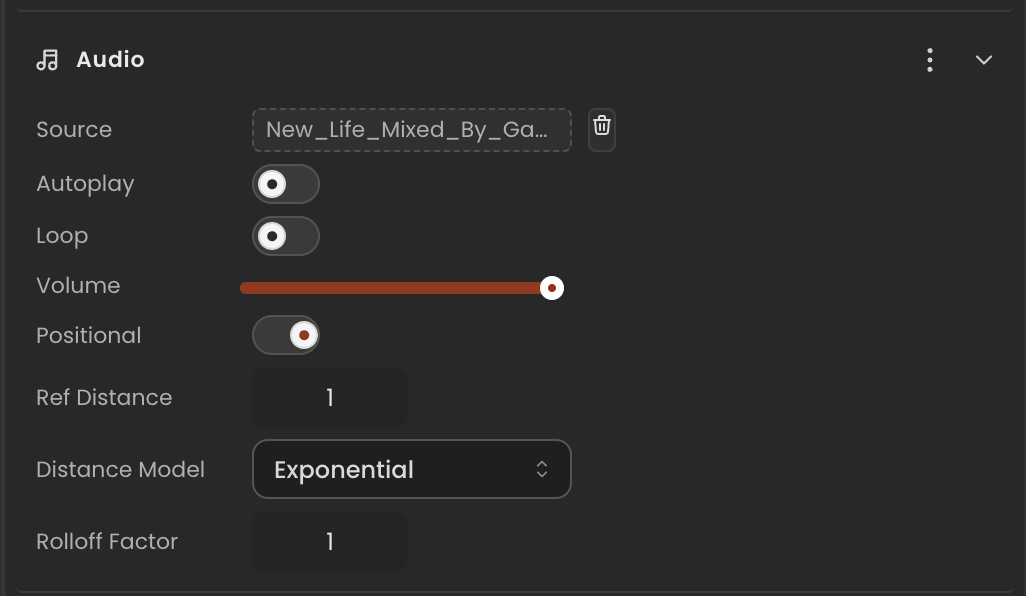
Properties
| Property | Type | Description |
|---|---|---|
path | string | Source URL or localasset:// path of the audio file. |
options | typeof DEFAULT_AUDIO_OPTIONS | Playback options. |
object | THREE.Object3D | null | Live three.js object hosting the audio (a parented Audio/PositionalAudio). null until built. |
audio | THREE.Audio<GainNode> | THREE.PositionalAudio | null | Live three.js audio source. null until built. Recreated when the project loads. |
isPlaying | boolean | Whether the audio should be playing. Managed by AudioSystem in preview. Non-enumerable — not persisted to snapshots or save data. Set via play / stop. |
isPaused | boolean | Whether the audio is paused mid-playback (position is preserved). Non-enumerable — not persisted to snapshots or save data. Set via pause / play / stop. |
API reference
- Class:
AudioComponent - Source:
core/components/Audio.ts
Scripting examples
Component access patterns
Use this.getComponent(X) to access a component on the entity this script is attached to. Use this.world.getEntityByName to find another entity by name, then this.world.getComponent to read its component:
// Component on the entity this script is on
const audio = this.getComponent(AudioComponent);

// Component on another entity, found by its scene name
const other = this.world.getEntityByName("AmbientSpeaker");
if (other) {
  const audio = this.world.getComponent(other.entityId, AudioComponent);
}
Play / stop on key press
Toggle audio playback when the player presses Space. Volume is exposed as an inspector field.
import { Behaviour, KeyboardKeys } from "@relu-interactives/spatial-ecs";
import { AudioComponent } from "@relu-interactives/spatial-ecs/components";
import type { FloatInput } from "@relu-interactives/spatial-ecs";

export default class AudioController extends Behaviour {
  data = {
    volume: 1 as FloatInput,
  };

  protected init() {
    const audio = this.getComponent(AudioComponent);
    if (audio) audio.options.volume = this.data.volume;
  }

  protected onUpdate() {
    const audio = this.getComponent(AudioComponent);
    if (!audio) return;

    // Keep volume in sync with the inspector slider
    audio.options.volume = this.data.volume;

    if (this.world.getKeyDown(KeyboardKeys.Space)) {
      if (audio.isPlaying) {
        audio.stop();
      } else {
        audio.play();
      }
    }
  }
}
Proximity-triggered audio
Start playing when the camera comes within a configurable range, and stop when it moves away.
import { Behaviour } from "@relu-interactives/spatial-ecs";
import { AudioComponent, TransformComponent, CameraComponent } from "@relu-interactives/spatial-ecs/components";
import type { FloatInput } from "@relu-interactives/spatial-ecs";

export default class ProximityAudio extends Behaviour {
  data = {
    triggerDistance: 3 as FloatInput,
  };

  protected onUpdate() {
    const audio = this.getComponent(AudioComponent);
    if (!audio) return;

    // Find the default camera entity
    let cameraPos = { x: 0, y: 0, z: 0 };
    for (const id of this.world.query(CameraComponent)) {
      const cam = this.world.getComponent(id, CameraComponent);
      if (cam?.isDefault) {
        const ct = this.world.getComponent(id, TransformComponent);
        if (ct) cameraPos = ct.position;
        break;
      }
    }

    const dx = this.transform.position.x - cameraPos.x;
    const dy = this.transform.position.y - cameraPos.y;
    const dz = this.transform.position.z - cameraPos.z;
    const dist = Math.sqrt(dx * dx + dy * dy + dz * dz);

    if (dist < this.data.triggerDistance && !audio.isPlaying) {
      audio.play();
    } else if (dist >= this.data.triggerDistance && audio.isPlaying) {
      audio.stop();
    }
  }
}
Playback methods
Use audio.play(), audio.pause(), and audio.stop() rather than calling methods on audio.audio directly. These helpers update isPlaying / isPaused so the AudioSystem applies the correct THREE.js call in preview.
Via ComponentInput in the inspector
You can also pick this component from the inspector using a ComponentInput field. Assign any entity in the inspector and the field resolves to the live AudioComponent instance at runtime.
import {
  Behaviour,
  type ComponentInput,
} from "@relu-interactives/spatial-ecs";
import {
  AudioComponent,
} from "@relu-interactives/spatial-ecs/components";

export default class Example extends Behaviour {
  data = {
    targetAudio: {
      type: "component",
      value: null,
    } as unknown as ComponentInput,
  };

  protected onUpdate() {
    const audio = this.data.targetAudio.value as AudioComponent | null;
    if (!audio) return;
    // Use the live component instance.
  }
}
Via EntityInput in the inspector
Alternatively, pick an entity from the inspector using an EntityInput field and then read the component off that entity via world.getComponent:
import {
  Behaviour,
  type EntityInput,
  type WorldEntityView,
} from "@relu-interactives/spatial-ecs";
import {
  AudioComponent,
} from "@relu-interactives/spatial-ecs/components";

export default class Example extends Behaviour {
  data = {
    targetEntity: { type: "entity", value: null } as unknown as EntityInput,
  };

  protected onUpdate() {
    const entity = this.data.targetEntity.value as WorldEntityView | null;
    if (!entity) return;

    const audio = this.world.getComponent(
      entity.entityId,
      AudioComponent,
    ) as AudioComponent | null;
    if (!audio) return;
    // Use the component on the picked entity.
  }
}