

DropdownInput
A select dropdown. The inspector renders a menu populated from the options array.
Runtime value: { options: DropdownOption[]; value: string } — read field.value
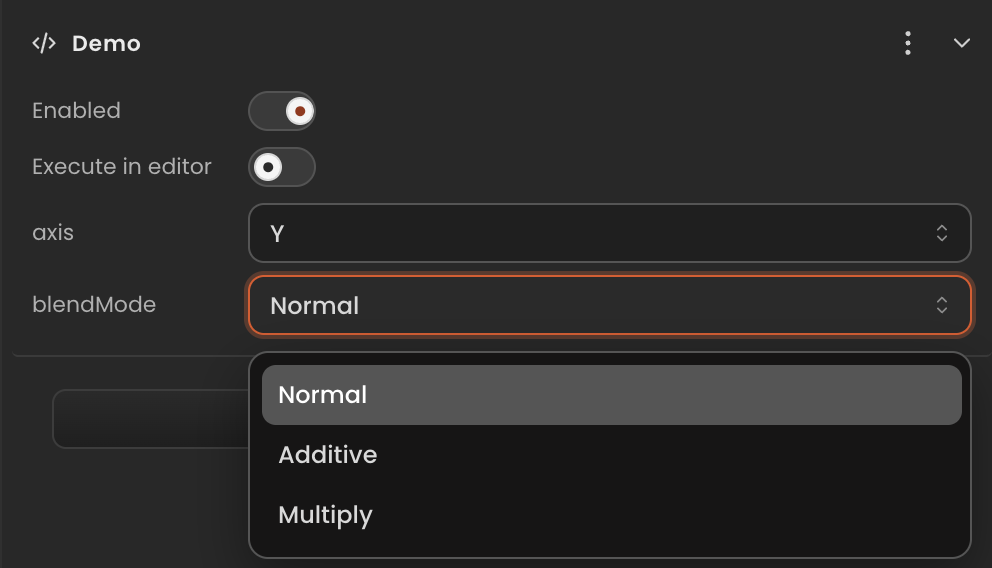
Declaration
Provide the full object including options and the initial selected value. The editor reads options to build the dropdown.
ts
import { Behaviour, type DropdownInput } from "@relu-interactives/spatial-ecs";

export default class Demo extends Behaviour {
  data = {
    axis: {
      value: "y",
      options: [
        { label: "X", value: "x" },
        { label: "Y", value: "y" },
        { label: "Z", value: "z" },
      ],
    } as DropdownInput,
    blendMode: {
      value: "normal",
      options: [
        { label: "Normal",   value: "normal" },
        { label: "Additive", value: "additive" },
        { label: "Multiply", value: "multiply" },
      ],
    } as DropdownInput,
  };
}
Runtime usage
Read the .value property. Cast to a union type for TypeScript narrowing:
ts
onUpdate() {
  const axis = this.data.axis.value as "x" | "y" | "z";
  this.transform.rotation[axis] += 0.01;
}
Notes
- Always include the full
optionsarray in the inline default — the editor needs it to render the dropdown. labelis what the user sees;valueis what you read at runtime.- The initial
valuemust match one of the optionvaluestrings.