

Physics
Combined rigid body and collider component backed by Rapier. values.rigidBody.type is one of dynamic, fixed, kinematicPosition, or kinematicVelocity. Per-axis translation/rotation locks constrain motion (e.g. lock Y rotation for top-down characters). Supported collider shapes: cuboid, ball, capsule, cylinder, trimesh. Set values.collider.isSensor to receive collision events without producing a physical response.
Managed by:
PhysicsSyncSystem
Collider sizing rules (read before authoring colliders)
Primitives auto-fit on add (v0.2.18+): adding a
PhysicsComponentto aplane,cube,sphere,capsule, orcylinderderives the collider from the mesh-geometry parameters automatically — a plane gets a thin local-Z slab and afixedbody, a cube gets its exact box, and so on. Models and entities without mesh geometry keep the generic 1 m cuboid default and must be sized explicitly. Auto-fit runs only when no explicit values are passed; saved/duplicated components are never altered. If you resize the mesh geometry AFTER adding physics, re-author the collider — it does not track later geometry edits.values.collider.sizeholds the cuboid's FULL edge lengths in meters — NOT half-extents. A 1 m cube issize: { x: 1, y: 1, z: 1 }.Collider dimensions (
size,radius,height) are authored in unscaled local units:PhysicsSyncSystemmultiplies them by the entity's world scale when building the collider. Author the dimensions of the unscaled mesh; scaling the entity keeps mesh and collider matched.offsetPositionis not multiplied by scale — it is applied in raw units. On a scaled entity, compute the offset in final world units.The collider is axis-aligned to the entity and follows the entity's
TransformComponentrotation (plusoffsetRotation). Aplaneprimitive is a vertical quad pre-rotatedrotation.x = -π/2to lie flat — keep that rotation, and put a plane floor's thin cuboid axis on local Z (geometry is 100×100 →size: { x: 100, y: 100, z: 0.05 }). A flattenedcubeis usually a more robust ground.Model (GLB) colliders are never auto-fitted from geometry — measure the mesh bounds and author dimensions explicitly, or use
trimeshfor complex static geometry.
Editor inspector
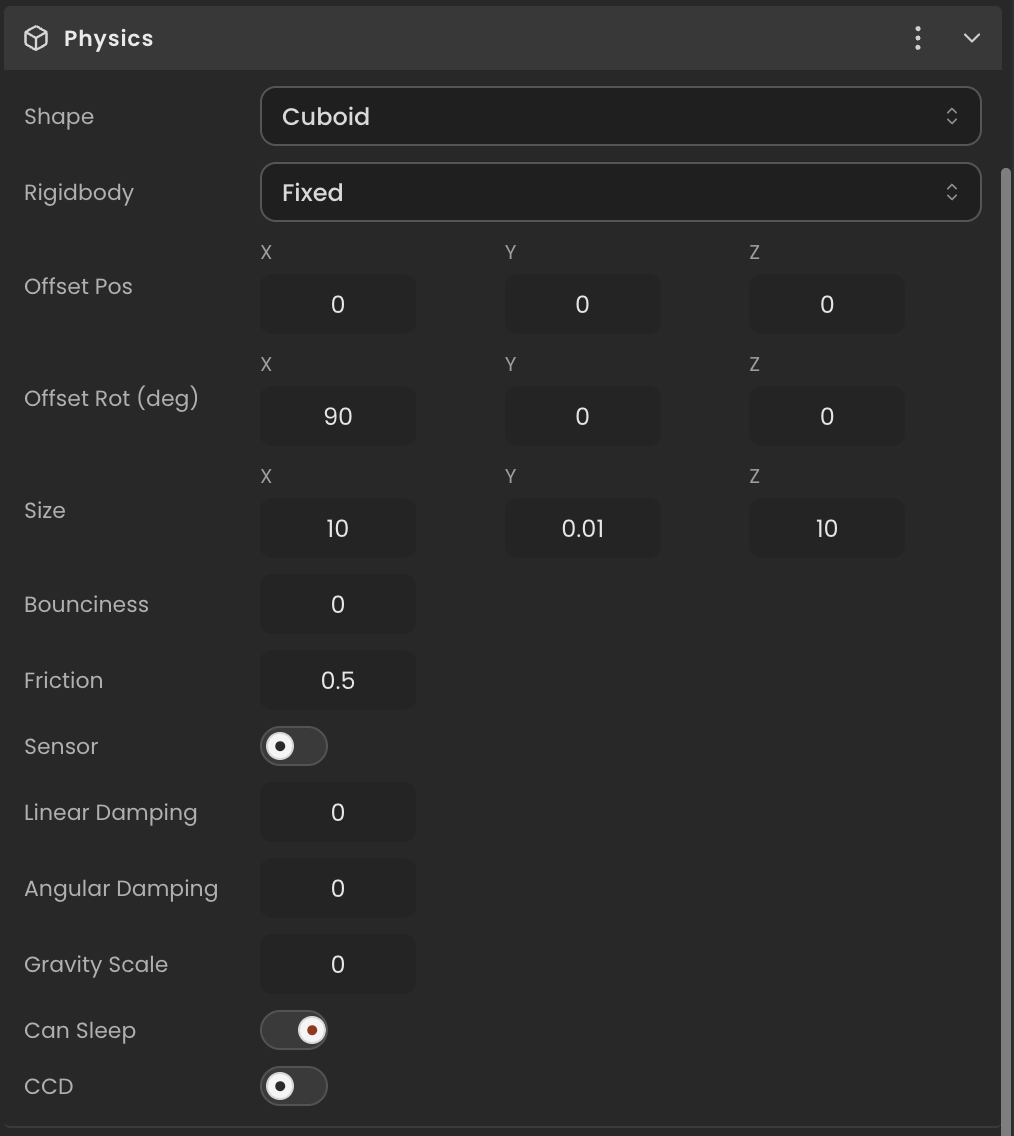
Properties
| Property | Type | Description |
|---|---|---|
values | PhysicsState | Authoring state containing rigidbody and collider sub-states. Saved with the project. |
values.rigidbody | RigidbodyState | Rigid body authoring state (type, gravity scale, locks, etc.). |
values.collider | ColliderState | Collider authoring state (shape, size, sensor flag, etc.). |
rigidBody | RapierRigidBody | null | Live Rapier rigid body. Recreated when the project loads; null until physics is initialized. |
collider | RapierCollider | null | Live Rapier collider. Recreated when the project loads; null until physics is initialized. |
API reference
- Class:
PhysicsComponent - Source:
core/components/Physics.ts
Scripting examples
Component access patterns
Use this.getComponent(X) to access a component on the entity this script is attached to. Use this.world.getEntityByName to find another entity by name, then this.world.getComponent to read its component:
// Component on the entity this script is on
const physics = this.getComponent(PhysicsComponent);

// Component on another entity, found by its scene name
const other = this.world.getEntityByName("Crate");
if (other) {
  const physics = this.world.getComponent(other.entityId, PhysicsComponent);
}
Apply a jump impulse
Apply a one-shot upward impulse to a dynamic rigid body when the player presses Space.
import { Behaviour, KeyboardKeys } from "@relu-interactives/spatial-ecs";
import { PhysicsComponent } from "@relu-interactives/spatial-ecs/components";
import type { FloatInput } from "@relu-interactives/spatial-ecs";

export default class Jumper extends Behaviour {
  data = {
    jumpForce: 5 as FloatInput,
  };

  protected onUpdate() {
    const physics = this.getComponent(PhysicsComponent);
    if (!physics?.rigidBody) return;

    if (this.world.getKeyDown(KeyboardKeys.Space)) {
      physics.rigidBody.applyImpulse({ x: 0, y: this.data.jumpForce, z: 0 }, true);
    }
  }
}
Move a kinematic body with arrow keys
Displace a kinematicPosition body each frame using the Rapier setNextKinematicTranslation API.
import { Behaviour, KeyboardKeys } from "@relu-interactives/spatial-ecs";
import { PhysicsComponent } from "@relu-interactives/spatial-ecs/components";
import type { FloatInput } from "@relu-interactives/spatial-ecs";

export default class KinematicMover extends Behaviour {
  data = {
    speed: 3 as FloatInput,
  };

  protected onUpdate() {
    const physics = this.getComponent(PhysicsComponent);
    if (!physics?.rigidBody) return;

    const pos = physics.rigidBody.translation();
    let dx = 0;
    let dz = 0;

    if (this.world.getKey(KeyboardKeys.ArrowLeft))  dx -= this.data.speed * this.deltaTime;
    if (this.world.getKey(KeyboardKeys.ArrowRight)) dx += this.data.speed * this.deltaTime;
    if (this.world.getKey(KeyboardKeys.ArrowUp))    dz -= this.data.speed * this.deltaTime;
    if (this.world.getKey(KeyboardKeys.ArrowDown))  dz += this.data.speed * this.deltaTime;

    physics.rigidBody.setNextKinematicTranslation({
      x: pos.x + dx,
      y: pos.y,
      z: pos.z + dz,
    });
  }
}
Via ComponentInput in the inspector
You can also pick this component from the inspector using a ComponentInput field. Assign any entity in the inspector and the field resolves to the live PhysicsComponent instance at runtime.
import {
  Behaviour,
  type ComponentInput,
} from "@relu-interactives/spatial-ecs";
import {
  PhysicsComponent,
} from "@relu-interactives/spatial-ecs/components";

export default class Example extends Behaviour {
  data = {
    targetPhysics: {
      type: "component",
      value: null,
    } as unknown as ComponentInput,
  };

  protected onUpdate() {
    const physics = this.data.targetPhysics.value as PhysicsComponent | null;
    if (!physics) return;
    // Use the live component instance.
  }
}
Via EntityInput in the inspector
Alternatively, pick an entity from the inspector using an EntityInput field and then read the component off that entity via world.getComponent:
import {
  Behaviour,
  type EntityInput,
  type WorldEntityView,
} from "@relu-interactives/spatial-ecs";
import {
  PhysicsComponent,
} from "@relu-interactives/spatial-ecs/components";

export default class Example extends Behaviour {
  data = {
    targetEntity: { type: "entity", value: null } as unknown as EntityInput,
  };

  protected onUpdate() {
    const entity = this.data.targetEntity.value as WorldEntityView | null;
    if (!entity) return;

    const physics = this.world.getComponent(
      entity.entityId,
      PhysicsComponent,
    ) as PhysicsComponent | null;
    if (!physics) return;
    // Use the component on the picked entity.
  }
}
Rigid body type
Set values.rigidBody.type to "kinematicPosition" in the inspector for the second example. Applying impulses requires a "dynamic" rigid body.